






Automated content moderation for LinkedIn - Simplified!
Our AI algorithms are industry-leading, closely matching the efficiency of human moderators. Don't burden yourself with manual moderation of your LinkedIn profile. Just install our intuitive tool.
Create your account
Sign up for free on Moderation API — no credit card required.
Connect LinkedIn
Add the moderation tool to your LinkedIn profile in minutes.
Reap the benefits
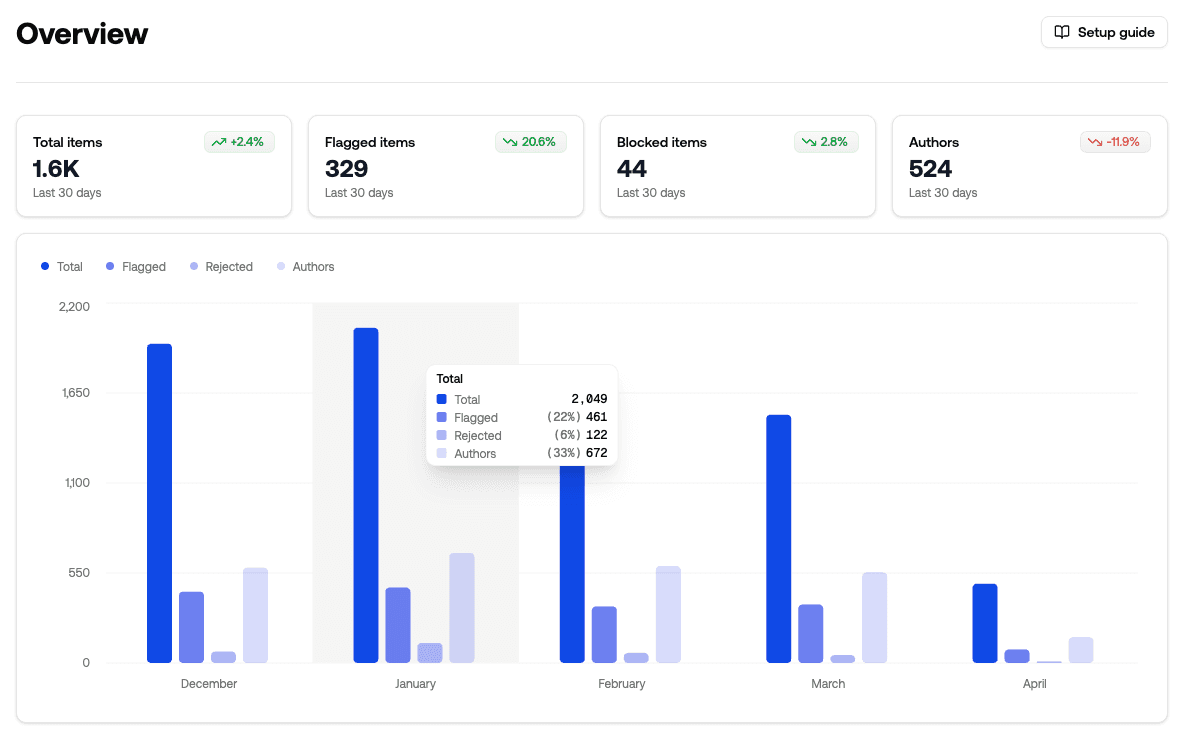
Customize your moderation settings and let AI maintain your reputation.
Your rules,
enforced by AI.
Powerful detection from day one.
Then fine-tune with your own rules and data.
Write your guidelines.
Describe what you want moderated the way you'd tell a new hire. Our models apply your rules with explanation and confidence — no prompt engineering required.
Hey, you seem really cool. Want to continue this on WhatsApp? My number is +1 555...
Use 20+ battle-tested models.
Drop in production-ready detection trained on billions of labels.
Moderate any data type.
Build custom logic.
Build if/then rules that combine user signals, content scores, and trust levels into instant actions.
120+ languages, one API.
Conversation intelligence.
Conversation history is considered with every decision - so the same sentence isn't treated the same way in every situation.
Safeguard your LinkedIn profile from spam, profanity, and all unpleasant content. Let our AI-powered moderation tool proactively weed out damaging content, leaving you to nurture a thriving digital community.
Frequently asked questions
Find answers to common queries about our LinkedIn Content Moderation solution.
Why moderate LinkedIn content?
Content moderation is key to maintaining professional integrity and brand reputation. It helps prevent spam and detrimental content that could hamper user experience. Efficient moderation tools can help your brand uphold its credibility and provide a safer online environment. Analyzing user sentiment will also provide valuable insights into your brand perception.
How does the tool analyze user sentiment?
Our AI algorithms analyze the comments and messages on your LinkedIn profile, identifying the tone and sentiment behind each response. Subsequently, it categorizes them as positive, negative, or neutral, allowing you to understand user sentiment better.
How does the tool impact my brand reputation?
Our tool proactively filters out any harmful content from your LinkedIn profile - be it spam, profanity, or toxic comments. This ensures only meaningful and respectful conversations are taking place, thereby enhancing your brand's reputation.
How does it work?
The tool assesses your LinkedIn content and sends it to our Moderation API for a detailed analysis. Based on the findings, the tool takes necessary actions automatically. You can customize these actions to cater to your specific needs.
Do I need to have technical knowledge to use this tool?
No. Our LinkedIn moderation tool is designed to be user-friendly. It's easy to install and tweak according to your needs, without requiring any coding knowledge.
How do I get started?
Start by signing up for a free account on our Moderation API here. Next, install our tool on your LinkedIn profile, and set it up as per your requirements. You're all set!